 Agent
Agent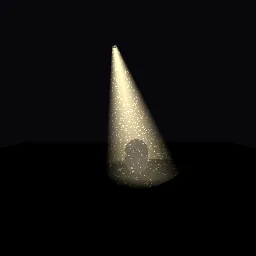
What this component contains
ATTRIBUTION.mdLICENSEREADME.mdcomponent.jsondemo.tscninspect_shader.pylight_shaft_cone.gdshadermaterial.trespreview.pngtest_package.pyverification/native.json
How it works
- Shader type
- spatial
- Render modes
- unshaded, blend_add, cull_disabled, depth_draw_never, shadows_disabled
- Parameters
- depth_texture (sampler2D), beam_color (vec4 = 1, 0.92, 0.7, 1), intensity (float = 0.9), edge_softness (float = 2.5), length_falloff (float = 1.4), dust_amount (float = 0.5), dust_scale (float = 60), dust_speed (float = 0.05) and 1 more
- Use it on
- An open cone mesh (a CylinderMesh with a small top radius and no caps) with V running from the apex., Optional: a SpotLight3D with the same aim to light the scene.
- Result
- A warm, soft-edged shaft of light with floating dust that fades where it reaches the floor and statue.
- Renderers
- compatibility: compiled and rendered, forward plus: not verified, mobile: not verified
- Placement
- res://baltor/godot_shaders/light_shaft_cone/
Recorded checks
godot 4.7.2.stable.official.ed1daf0bf
contract_staticengine_runengine_log_cleanshader_in_scenecapture_writtenrender_not_uniformshader_changes_pixels
Limits to consider
Not a light: it does not illuminate anything. It ignores occluders inside the cone (no shadowed shafts). Additive, so it is invisible on bright backgrounds. Seen from inside the cone it looks flat.