 Agent
Agent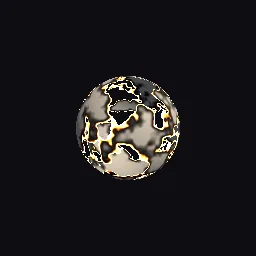
What this component contains
ATTRIBUTION.mdLICENSEREADME.mdcomponent.jsondemo.tscninspect_shader.pymaterial.tresnoise_dissolve_burn.gdshaderpreview.pngtest_package.pyverification/native.json
How it works
- Shader type
- spatial
- Render modes
- cull_disabled
- Parameters
- albedo (vec4 = 0.82, 0.78, 0.72, 1), roughness (float = 0.6), dissolve (float = 0.45), noise_scale (float = 4), edge_width (float = 0.04), char_width (float = 0.08), edge_color (vec4 = 1, 0.42, 0.06, 1), ember_color (vec4 = 1, 0.9, 0.55, 1) and 3 more
- Result
- A mesh with holes eaten into it, rimmed by orange glowing edges and a dark charred border.
- Renderers
- compatibility: compiled and rendered, forward plus: not verified, mobile: not verified
- Placement
- res://baltor/godot_shaders/noise_dissolve_burn/
Recorded checks
godot 4.7.2.stable.official.ed1daf0bf
contract_staticengine_runengine_log_cleanshader_in_scenecapture_writtenrender_not_uniformshader_changes_pixels
Limits to consider
Discard disables some early depth optimizations, so large dissolving meshes cost more to draw. The inside of the mesh is the back faces, lit as the outside. Shadows use the same discard and match the holes. The noise is value noise, so its lattice can show at very low scales.